Container vulnerability scanning with Trivy
Container vulnerability scanning
with Trivy

Share on linkedinWithin the framework of security in container, the build phase is of vital importance as we need to select the base image on which applications will run. Not having automatic mechanisms for vulnerability scanning can lead to production environments with insecure applications with the risks that involves.In this article we will cover vulnerability scanning using Aqua Security’s Trivy solution, but before we begin, we need to explain what the basis is for these types of solutions for identifying vulnerabilities in Docker images.Introduction to CVE (Common Vulnerabilities and Exposures)
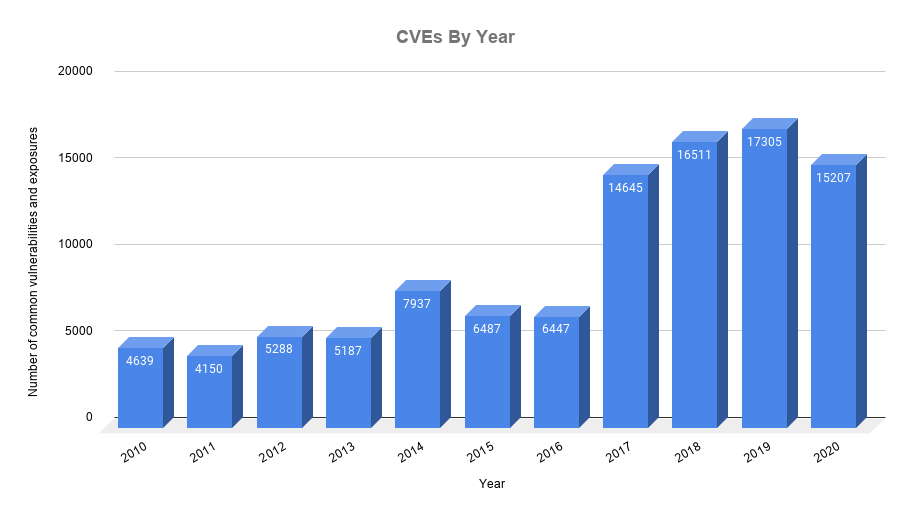 CVE is a list of information maintained by MITRE Corporation which is aimed at centralising the records of known security vulnerabilities, where each reference has a CVE-ID number, description of the vulnerability, which versions of the software are affected, possible fix for the flaw (if any) or how to configure to mitigate the vulnerability and references to publications or posts in forums or blogs where the vulnerability has been made public or its exploitation is demonstrated.The CVE-ID provides a standard naming convention for uniquely identifying a vulnerability. They are classified into 5 typologies, which we will look at in the Interpreting the analysis section. These types are assigned based on different metrics (if you are curious, see CVSS Calculator v3).CVE has become the standard for vulnerability recording, so it is used by the great majority of technology companies and individuals.There are various channels for keeping informed of all the news related to vulnerabilities: official blog, Twitter, cvelist on GitHub and LinkedIn.If you want more detailed information about a vulnerability, you can also consult the NIST website, specifically the NVD (National Vulnerability Database).We invite you to search for one of the following critical vulnerabilities. It is quite possible that they have affected you directly or indirectly. We should forewarn you that they have been among the most discussed
Aqua Security – Trivy
Trivy is an open source tool focused on detecting vulnerabilities in OS-level packages and dependency files for various languages:
- OS packages: (Alpine, Red Hat Universal Base Image, Red Hat Enterprise Linux, CentOS, Oracle Linux, Debian, Ubuntu, Amazon Linux, openSUSE Leap, SUSE Enterprise Linux, Photon OS and Distroless)
- Application dependencies: (Bundler, Composer, Pipenv, Poetry, npm, yarn and Cargo)
Aqua Security, a company specialising in development of security solutions, acquired Trivy in 2019. Together with a substantial number of collaborators, they are responsible for developing and maintaining it.
Installation
Trivy has installers for most Linux and MacOS systems. For our tests, we will use the generic installer:
curl -sfL https://raw.githubusercontent.com/aquasecurity/trivy/master/contrib/install.sh | sudo sh -s -- -b /usr/local/bin If we do not want to persist the binary on our system, we have a Docker image:
docker run --rm -v /var/run/docker.sock:/var/run/docker.sock -v /tmp/trivycache:/root/.cache/ aquasec/trivy python:3.4-alpine Basic operations
- Local images
Trivy has installers for most Linux and MacOS systems. For our tests, we will use the generic installer:
#!/bin/bash
docker build -t cloud-practice/alpine:latest -<- Remote images
#!/bin/bash
trivy image python:3.4-alpine - Local projects:
Enable you to analyse dependency files (outputs):- Pipfile.lock: Python
- package-lock_react.json: React
- Gemfile_rails.lock: Rails
- Gemfile.lock: Ruby
- Dockerfile: Docker
- composer_laravel.lock: PHP Lavarel
- Cargo.lock: Rust
#!/bin/bash
git clone https://github.com/knqyf263/trivy-ci-test
trivy fs trivy-ci-test - Public repositories:
#!/bin/bash
trivy repo https://github.com/knqyf263/trivy-ci-test - Private image repositories:
- Cache database
The vulnerability database is hosted on GitHub. To avoid downloading this database in each analysis operation, you can use the--cache-dirparameter:
#!/bin/bash trivy –cache-dir .cache/trivy image python:3.4-alpine3.9 - Filter by severity
#!/bin/bash
trivy image --severity HIGH,CRITICAL ruby:2.4.0 - Filter unfixed vulnerabilities
#!/bin/bash
trivy image --ignore-unfixed ruby:2.4.0 - Specify output code
This option is very useful in the continuous integration process, as we can specify that your pipeline ends in error when vulnerabilities of the critical type are found, but medium and high types finish properly.
#!/bin/bash
trivy image --exit-code 0 --severity MEDIUM,HIGH ruby:2.4.0
trivy image --exit-code 1 --severity CRITICAL ruby:2.4.0 - Ignore specific vulnerabilities
You can specify those CVEs you want to ignore by using the .trivyignore file. This can be useful if the image contains a vulnerability that does not affect your development.
#!/bin/bash
cat .trivyignore
# Accept the risk
CVE-2018-14618
# No impact in our settings
CVE-2019-1543 - Export output in JSON format:
This option is useful if you want to automate a process before an output, display the results in a custom front end, or persist the output in a structured format.
#!/bin/bash
trivy image -f json -o results.json golang:1.12-alpine
cat results.json | jq - Export output in SARIF format:
There is a standard called SARIF (Static Analysis Results Interchange Format) that defines the format for outputs that any vulnerability analysis tool should have.
#!/bin/bash
wget https://raw.githubusercontent.com/aquasecurity/trivy/master/contrib/sarif.tpl
trivy image --format template --template "@sarif.tpl" -o report-golang.sarif  golang:1.12-alpine
cat report-golang.sarif
VS Code has the sarif-viewer extension for viewing vulnerabilities.
Continuous integration processes
Trivy has templates for the leading CI/CD solutions:
#!/bin/bash
$ cat .gitlab-ci.yml
stages:
  - test
trivy:
  stage: test
  image: docker:stable-git
  before_script:
    - docker build -t trivy-ci-test:${CI_COMMIT_REF_NAME} .
    - export VERSION=$(curl --silent "https://api.github.com/repos/aquasecurity/trivy/releases/latest" | grep '"tag_name":' | sed -E 's/.*"v([^"]+)".*/1/')
    - wget https://github.com/aquasecurity/trivy/releases/download/v${VERSION}/trivy_${VERSION}_Linux-64bit.tar.gz
    - tar zxvf trivy_${VERSION}_Linux-64bit.tar.gz
  variables:
    DOCKER_DRIVER: overlay2
  allow_failure: true
  services:
    - docker:stable-dind
  script:
    - ./trivy --exit-code 0 --severity HIGH --no-progress --auto-refresh trivy-ci-test:${CI_COMMIT_REF_NAME}
    - ./trivy --exit-code 1 --severity CRITICAL --no-progress --auto-refresh trivy-ci-test:${CI_COMMIT_REF_NAME}
Interpreting the analysis
#!/bin/bash
trivy image httpd:2.2-alpine
2020-10-24T09:46:43.186+0200    INFO    Need to update DB
2020-10-24T09:46:43.186+0200    INFO    Downloading DB...
18.63 MiB / 18.63 MiB [---------------------------------------------------------] 100.00% 8.78 MiB p/s 3s
2020-10-24T09:47:08.571+0200    INFO    Detecting Alpine vulnerabilities...
2020-10-24T09:47:08.573+0200    WARN    This OS version is no longer supported by the distribution: alpine 3.4.6
2020-10-24T09:47:08.573+0200    WARN    The vulnerability detection may be insufficient because security updates are not provided
httpd:2.2-alpine (alpine 3.4.6)
===============================
Total: 32 (UNKNOWN: 0, LOW: 0, MEDIUM: 15, HIGH: 14, CRITICAL: 3)
+-----------------------+------------------+----------+-------------------+------------------+--------------------------------+
|        LIBRARY        | VULNERABILITY ID | SEVERITY | INSTALLED VERSION |  FIXED VERSION   |             TITLE              |
+-----------------------+------------------+----------+-------------------+------------------+--------------------------------+
| libcrypto1.0          | CVE-2018-0732    | HIGH     | 1.0.2n-r0         | 1.0.2o-r1        | openssl: Malicious server can  |
|                       |                  |          |                   |                  | send large prime to client     |
|                       |                  |          |                   |                  | during DH(E) TLS...            |
+-----------------------+------------------+----------+-------------------+------------------+--------------------------------+
| postgresql-dev        | CVE-2018-1115    | CRITICAL | 9.5.10-r0         | 9.5.13-r0        | postgresql: Too-permissive     |
|                       |                  |          |                   |                  | access control list on         |
|                       |                  |          |                   |                  | function pg_logfile_rotate()   |
+-----------------------+------------------+----------+-------------------+------------------+--------------------------------+
| libssh2-1             | CVE-2019-17498   | LOW      | 1.8.0-2.1         |                  | libssh2: integer overflow in   |
|                       |                  |          |                   |                  | SSH_MSG_DISCONNECT logic in    |
|                       |                  |          |                   |                  | packet.c                       |
+-----------------------+------------------+----------+-------------------+------------------+--------------------------------+ - Library: the library/package identifying the vulnerability.
- Vulnerability ID: vulnerability identifier (according to CVE standard).
- Severity: there is a classification with 5 typologies [source] which are assigned a CVSS (Common Vulnerability Scoring System) score:
- Critical (CVSS Score 9.0-10.0): flaws that could be easily exploited by a remote unauthenticated attacker and lead to system compromise (arbitrary code execution) without requiring user interaction.
- High (CVSS score 7.0-8.9): flaws that can easily compromise the confidentiality, integrity or availability of resources.
- Medium (CVSS score 4.0-6.9): flaws that may be more difficult to exploit but could still lead to some compromise of the confidentiality, integrity or availability of resources under certain circumstances.
- Low (CVSS score 0.1-3.9): all other issues that may have a security impact. These are the types of vulnerabilities that are believed to require unlikely circumstances to be able to be exploited, or which would give minimal consequences.
- Unknown (CVSS score 0.0): allocated to vulnerabilities with no assigned score.
- Installed version: the version installed in the system analysed.
- Fixed version: the version in which the issue is fixed. If the version is not reported, this means the fix is pending.
- Title: A short description of the vulnerability. For further information, see the NVD.
Now you know how to interpret at the analysis information at a high level. So, what actions should you take? We give you some pointers in the Recommendations section.
Recommendations
-
This section describes some of the most important aspects within the scope of vulnerabilities in containers:
- Avoid (wherever possible) using images in which critical and high severity vulnerabilities have been identified.
- Include image analysis in CI processes
Security in development is not optional; automate your testing and do not rely on manual processes. - Use lightweight images, fewer exposures:
Images of the Alpine / BusyBox type are built with as few packages as possible (the base image is 5 MB), resulting in reduced attack vectors. They support multiple architectures and are updated quite frequently.
REPOSITORY  TAG     IMAGE ID      CREATED      SIZE
alpine      latest  961769676411  4 weeks ago  5.58MB
ubuntu      latest  2ca708c1c9cc  2 days ago   64.2MB
debian      latest  c2c03a296d23  9 days ago   114MB
centos      latest  67fa590cfc1c  4 weeks ago  202MB
If for a dependencies reason, you cannot customise an Alpine base image, look for slim-type images from trusted software vendors. Apart from the security component, people who share a network with you will appreciate not having to download 1 GB images.
- Get images from official repositories: Using DockerHub is recommended, and preferably images from official publishers. DockerHub and CVEs
- Keep images up to date: the following example shows an analysis of two different Apache versions:
Image published in 11/2018
httpd:2.2-alpine (alpine 3.4.6)
 Total: 32 (UNKNOWN: 0, LOW: 0, MEDIUM: 15, **HIGH: 14, CRITICAL: 3**)
Image published in 01/2020
httpd:alpine (alpine 3.12.1)
 Total: 0 (UNKNOWN: 0, LOW: 0, MEDIUM: 0, **HIGH: 0, CRITICAL: 0**)
As you can see, if a development was completed in 2018 and no maintenance was performed, you could be exposing a relatively vulnerable Apache. This is not an issue resulting from the use of containers. However, because of the versatility Docker provides for testing new product versions, we now have no excuse.
- Pay special attention to vulnerabilities affecting the application layer:
According to the study conducted by the company edgescan, 19% of vulnerabilities detected in 2018 were associated with Layer 7 (OSI Model), with XSS (Cross-site Scripting) type attacks standing out above all. - Select latest images with special care:
Although this advice is closely related to the use of lightweight images, we consider it worth inserting a note on latest images:
Latest Apache image (Alpine base 3.12)
httpd:alpine (alpine 3.12.1)
 Total: 0 (UNKNOWN: 0, LOW: 0, MEDIUM: 0, HIGH: 0, CRITICAL: 0)
Latest Apache image (Debian base 10.6)
httpd:latest (debian 10.6)
 Total: 119 (UNKNOWN: 0, LOW: 87, MEDIUM: 10, HIGH: 22, CRITICAL: 0)
We are using the same version of Apache (2.4.46) in both cases, the difference is in the number of critical vulnerabilities.
Does this mean that the Debian base 10 image makes the application running on that system vulnerable? It may or may not be. You need to assess whether the vulnerabilities could compromise your application. The recommendation is to use the Alpine image.
- Evaluate the use of Docker distroless images
The distroless concept is from Google and consists of Docker images based on Debian9/Debian10, without package managers, shells or utilities. The images are focused on programming languages (Java, Python, Golang, Node.js, dotnet and Rust), containing only what is required to run the applications. As they do not have package managers, you cannot install your own dependencies, which can be a big advantage or in other cases a big obstacle. Do testing and if it fits your project requirements, go ahead; it is always useful to have alternatives. Maintenance is Google’s responsibility, so the security aspect will be well-defined.
Container vulnerability scanner ecosystem
In our case we have used Trivy as it is a reliable, stable, open source tool that is being developed continually, but there are numerous tools for container analysis:
Do you want to know more about what we offer and to see other success stories?
DISCOVER BLUETAB
Share on twitter
Share on linkedin
Share on linkedinWithin the framework of security in container, the build phase is of vital importance as we need to select the base image on which applications will run. Not having automatic mechanisms for vulnerability scanning can lead to production environments with insecure applications with the risks that involves.In this article we will cover vulnerability scanning using Aqua Security’s Trivy solution, but before we begin, we need to explain what the basis is for these types of solutions for identifying vulnerabilities in Docker images.Introduction to CVE (Common Vulnerabilities and Exposures)
CVE is a list of information maintained by MITRE Corporation which is aimed at centralising the records of known security vulnerabilities, where each reference has a CVE-ID number, description of the vulnerability, which versions of the software are affected, possible fix for the flaw (if any) or how to configure to mitigate the vulnerability and references to publications or posts in forums or blogs where the vulnerability has been made public or its exploitation is demonstrated.The CVE-ID provides a standard naming convention for uniquely identifying a vulnerability. They are classified into 5 typologies, which we will look at in the Interpreting the analysis section. These types are assigned based on different metrics (if you are curious, see CVSS Calculator v3).CVE has become the standard for vulnerability recording, so it is used by the great majority of technology companies and individuals.There are various channels for keeping informed of all the news related to vulnerabilities: official blog, Twitter, cvelist on GitHub and LinkedIn.If you want more detailed information about a vulnerability, you can also consult the NIST website, specifically the NVD (National Vulnerability Database).We invite you to search for one of the following critical vulnerabilities. It is quite possible that they have affected you directly or indirectly. We should forewarn you that they have been among the most discussed
Ángel Maroco
AWS Cloud Architect
My name is Ángel Maroco and I have been working in the IT sector for over a decade. I started my career in web development and then moved on for a significant period to IT platforms in banking environments and have been working on designing solutions in AWS environments for the last 5 years.
I now combine my role as an architect with being head of /bluetab Cloud Practice, with the mission of fostering Cloud culture within the company.
SOLUTIONS, WE ARE EXPERTS
DATA STRATEGY
DATA FABRIC
AUGMENTED ANALYTICS
You may be interested in